
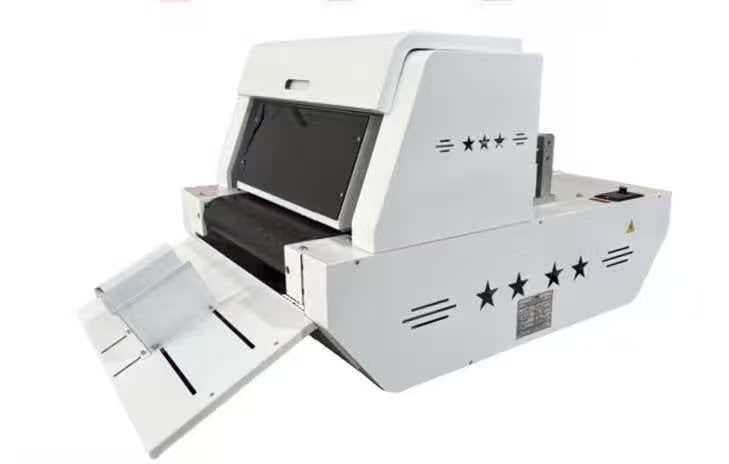
ZMK400 Single Pass Digital Printer FAQ and Printing Cost Calculation Logic
 Mia
Mia
Introduction: Answering Your Most Important Questions
When considering an investment in printing equipment, questions about functionality, costs, and practical implementation are natural and essential. This comprehensive FAQ guide addresses the most common questions about the ZMK400 while providing detailed cost calculation methodologies to help you determine the true cost of ownership and revenue potential.
Whether you're evaluating the ZMK400 for your business or comparing it with alternatives, this guide provides the information you need to make an informed decision.
Chapter 1: Frequently Asked Questions About the ZMK400
Q1: What materials can the ZMK400 print on?
A: The ZMK400 supports 18+ material types, making it one of the most versatile single-pass printers available. Supported materials include:
Standard Materials:
- Corrugated cardboard and boxes
- Kraft paper and board
- White cardboard
- Paper bags
- Packaging boxes
- Folding boards
Specialty Materials:
- Honeycomb paper
- Offset paper
- Boxboard and grey board
- Cotton paper
- Rice paper (Xuan paper)
- Napkin paper
- Drawing paper
- Thin wood sheets
- Double-sided adhesive paper
- Box board paper
This versatility is significantly greater than competitors. For comparison, MTU Tech supports 4 material types, while Giftec Leopard-S630 supports 5 material types.
Q2: What is the maximum print width and height?
A: The ZMK400 offers flexible print dimensions:
- Maximum Print Width: 215 mm (standard), expandable to 400 mm with optional configuration
- Maximum Print Height/Thickness: Up to 1-9 cm (customizable)
- Feed Width: 400 mm
This means you can print on everything from small labels to large boxes, with thickness accommodating both flat materials and 3D objects like boxes and packages.
Q3: What is the print speed and resolution?
A: The ZMK400 offers flexible speed and resolution options:
Print Speed: Up to 30 meters per minute (m/min)
Resolution Options:
- 300×1200 dpi (fastest, suitable for simple designs)
- 600×1200 dpi (balanced speed and quality)
- 1200×1200 dpi (highest quality, suitable for detailed artwork)
This flexibility allows you to optimize for different applications. For example, you might use 300×1200 dpi for simple color blocks and 1200×1200 dpi for photographic images.
Q4: Is the ZMK400 food-safe?
A: Yes, the ZMK400 is certified for food-grade printing. It uses eco-friendly, water-based inks that are:
- Non-toxic
- Odorless
- Food-grade safe
- Compliant with FDA regulations
This certification makes the ZMK400 ideal for pizza boxes, bakery packaging, beverage labels, and any food-related applications.
Q5: What is the maintenance requirement?
A: The ZMK400 uses HP Thermal Inkjet (TIJ) technology, which requires minimal maintenance:
- Printhead Refresh: Occurs automatically with each cartridge change (no manual cleaning required)
- Daily Maintenance: Minimal—primarily involves checking ink levels and clearing any paper jams
- Weekly Maintenance: Optional cleaning of the print area
- Annual Maintenance: Professional servicing recommended (typically $500-1,000)
This is significantly simpler than traditional printing equipment, which requires regular cleaning cycles and professional maintenance.
Q6: What is the operating environment requirement?
A: The ZMK400 operates in a wide range of environmental conditions:
- Temperature: 0°C to 35°C (widest range among competitors)
- Humidity: 35% to 85% RH
- Power: 220VAC, 50Hz, 1000W maximum
Notably, the ZMK400 does not require a climate-controlled room, unlike competitors that typically require 20-28°C environments. This significantly reduces infrastructure costs.
Q7: How does variable data printing work?
A: Variable data printing (VDP) allows different information to be printed on each item without stopping the printer. Common applications include:
- Personalization: Customer names, addresses, or messages
- Sequential Numbering: Serial numbers, batch codes, or order numbers
- QR Codes: Unique codes for each item linking to different URLs or information
- Date/Time Coding: Automatic expiration dates or production dates
- Conditional Printing: Different designs based on data fields
VDP requires design software that supports variable data and a data source (typically a CSV file or database). The ZMK400 integrates with standard design software like Adobe Illustrator and CorelDRAW.
Q8: What is the warranty and support?
A: The ZMK400 includes:
- Warranty: 13 months standard warranty
- Technical Support: 24/7 hotline plus remote diagnosis capability
- Lifetime Technical Support: Included with purchase
- Sales Model: Factory-direct (no distributor markup)
This direct-from-factory model ensures competitive pricing and direct access to technical support.
Chapter 2: Printing Cost Calculation Logic
Understanding the true cost of printing is essential for accurate business planning. This section provides detailed methodologies for calculating per-unit printing costs.
Cost Components
The total cost of printing includes several components:
1. Ink Cost
2. Material Cost
3. Labor Cost
4. Equipment Depreciation
5. Overhead Allocation
Detailed Cost Calculation Methodology
Step 1: Calculate Ink Cost Per Unit
Formula: Ink Cost Per Unit = (Total Ink Cost ÷ Ink Coverage Area) × Area Per Unit
Example Calculation:
Assume:
- Ink cartridge cost: $50
- Cartridge yield: 10,000 m² (based on HP specifications)
- Print area per unit: 0.1 m² (for a 10cm × 10cm box)
Calculation:
- Ink cost per m²: $50 ÷ 10,000 m² = $0.005 per m²
- Ink cost per unit: $0.005 × 0.1 m² = $0.0005 per unit
Note: This is an extremely low cost, typically $0.0005-0.002 per unit depending on coverage.
Step 2: Calculate Material Cost Per Unit
Formula: Material Cost Per Unit = Material Price Per Unit
Example Calculation:
Assume:
- Corrugated box cost: $0.30 per unit (purchased in bulk)
- Kraft paper bag cost: $0.15 per unit
- Cotton paper sheet cost: $0.50 per unit
These are typical wholesale prices for materials purchased in volume.
Step 3: Calculate Labor Cost Per Unit
Formula: Labor Cost Per Unit = (Hourly Wage × Setup Time + Hourly Wage × Production Time) ÷ Units Produced
Example Calculation:
Assume:
- Hourly wage: $20 (including benefits)
- Setup time: 15 minutes ($5 per job)
- Production time: 1 hour for 100 units
- Labor per unit: ($5 ÷ 100) + ($20 ÷ 100) = $0.05 + $0.20 = $0.25 per unit
Note: For large production runs, labor cost per unit decreases significantly.
Step 4: Calculate Equipment Depreciation Per Unit
Formula: Equipment Depreciation Per Unit = (Equipment Cost ÷ Expected Lifespan in Units) × Units Produced
Example Calculation:
Assume:
- Equipment cost: $50,000
- Expected lifespan: 5 years
- Expected production: 1,000,000 units over 5 years
- Depreciation per unit: $50,000 ÷ 1,000,000 = $0.05 per unit
Step 5: Calculate Total Cost Per Unit
Formula: Total Cost Per Unit = Ink Cost + Material Cost + Labor Cost + Depreciation + Overhead
Example Calculation for Custom Pizza Boxes:
| Cost Component | Cost Per Unit |
| Ink | $0.001 |
| Material (corrugated box) | $0.30 |
| Labor | $0.05 |
| Equipment Depreciation | $0.05 |
| Overhead (10%) | $0.04 |
| Total Cost Per Unit | $0.441 |
Pricing Strategy and Margin Calculation
Once you understand your cost per unit, you can develop pricing strategy:
Formula: Selling Price = Cost Per Unit ÷ (1 - Desired Margin %)
Example Pricing Scenarios:
| Scenario | Cost Per Unit | Desired Margin | Selling Price | Margin Amount |
| Standard | $0.441 | 40% | $0.735 | $0.294 |
| Premium | $0.441 | 50% | $0.882 | $0.441 |
| Competitive | $0.441 | 30% | $0.630 | $0.189 |
Break-Even Analysis
Formula: Break-Even Units = Fixed Costs ÷ (Selling Price - Variable Cost Per Unit)
Example Calculation:
Assume:
- Fixed costs (equipment, facility): $50,000 annually
- Selling price: $0.735 per unit
- Variable cost: $0.35 per unit (ink, material, labor)
- Contribution margin: $0.385 per unit
Break-Even Calculation:
- Break-even units: $50,000 ÷ $0.385 = 129,870 units annually
- Break-even units per month: 10,822 units
- Break-even units per day (250 working days): 519 units
This demonstrates that even with conservative pricing, a single ZMK400 can achieve break-even within reasonable production volumes.
Chapter 3: Real-World Cost Examples
Example 1: Pizza Box Printing Business
Business Profile:
- Print 50,000 custom pizza boxes annually
- Average box size: 300mm × 300mm × 50mm
- Print area: 0.09 m² per box
Cost Calculation:
| Cost Component | Per Unit | Annual (50,000 units) |
| Ink | $0.001 | $50 |
| Material | $0.30 | $15,000 |
| Labor | $0.05 | $2,500 |
| Equipment Depreciation | $0.05 | $2,500 |
| Overhead | $0.04 | $2,000 |
| Total Cost | $0.441 | $22,050 |
Revenue Calculation:
- Selling price: $0.75 per box
- Annual revenue: $37,500
- Gross profit: $15,450
- Gross margin: 41%
ROI Analysis:
- Equipment cost: $50,000
- Annual profit: $15,450
- Payback period: 3.2 years
Example 2: Print Service Provider
Business Profile:
- Average job size: 5,000 units
- Average selling price: $0.50 per unit
- 20 jobs per month (100,000 units/month)
Cost Calculation:
| Cost Component | Per Unit | Monthly (100,000 units) |
| Ink | $0.001 | $100 |
| Material | $0.20 | $20,000 |
| Labor | $0.08 | $8,000 |
| Equipment Depreciation | $0.04 | $4,000 |
| Overhead | $0.04 | $4,000 |
| Total Cost | $0.37 | $36,100 |
Revenue Calculation:
- Monthly revenue: $50,000
- Monthly profit: $13,900
- Monthly margin: 28%
- Annual profit: $166,800
ROI Analysis:
- Equipment cost: $50,000
- Payback period: 3.6 months
Example 3: Specialty Material Printing (Cotton Paper)
Business Profile:
- Print on premium cotton paper
- Average unit: 10cm × 10cm sheet
- Print area: 0.01 m² per unit
- 30,000 units annually
Cost Calculation:
| Cost Component | Per Unit | Annual (30,000 units) |
| Ink | $0.0005 | $15 |
| Material (cotton paper) | $0.50 | $15,000 |
| Labor | $0.10 | $3,000 |
| Equipment Depreciation | $0.05 | $1,500 |
| Overhead | $0.08 | $2,400 |
| Total Cost | $0.7305 | $21,915 |
Revenue Calculation:
- Selling price: $1.50 per unit (premium positioning)
- Annual revenue: $45,000
- Annual profit: $23,085
- Gross margin: 51%
ROI Analysis:
- Equipment cost: $50,000
- Payback period: 2.2 years
Chapter 4: Cost Optimization Strategies
Reducing Material Costs
1. Volume Purchasing: Negotiate bulk discounts with material suppliers. Volume discounts typically range from 10-25%.
2. Material Selection: Choose materials that balance quality with cost. For example, kraft paper is significantly cheaper than cotton paper while still offering professional appearance.
3. Supplier Relationships: Develop relationships with multiple suppliers to ensure competitive pricing and reliable delivery.
4. Waste Reduction: Optimize designs to minimize material waste. Even small improvements can significantly reduce costs on large production runs.
Reducing Labor Costs
1. Automation: Implement design templates and variable data printing to reduce manual design time.
2. Operator Training: Well-trained operators work faster and produce higher quality output, reducing rework costs.
3. Batch Processing: Group similar jobs together to minimize setup time.
4. Workflow Optimization: Design efficient workflows that minimize handling and material movement.
Reducing Equipment Costs
1. Preventive Maintenance: Regular maintenance prevents costly repairs and extends equipment lifespan.
2. Optimal Utilization: Maximize equipment utilization to spread fixed costs across more units.
3. Energy Efficiency: The ZMK400 uses only 1000W maximum power, resulting in low energy costs compared to larger equipment.
Chapter 5: Financial Planning and Projections
5-Year Financial Projection Template
| Year | Units Produced | Revenue | Total Costs | Gross Profit | Cumulative Profit |
| 1 | 500,000 | $250,000 | $185,000 | $65,000 | $65,000 |
| 2 | 750,000 | $375,000 | $277,500 | $97,500 | $162,500 |
| 3 | 1,000,000 | $500,000 | $370,000 | $130,000 | $292,500 |
| 4 | 1,200,000 | $600,000 | $444,000 | $156,000 | $448,500 |
| 5 | 1,500,000 | $750,000 | $555,000 | $195,000 | $643,500 |
Key Assumptions:
- Selling price: $0.50 per unit (conservative estimate)
- Variable cost per unit: $0.37 (decreases slightly with volume)
- Fixed costs: $50,000 annually (equipment depreciation, facility, overhead)
Sensitivity Analysis
Understanding how changes in key variables affect profitability is essential for risk management:
Impact of 10% Price Reduction:
- Annual revenue reduction: $25,000 (at 500,000 units)
- Impact on profitability: -38% reduction in gross profit
Impact of 10% Material Cost Increase:
- Annual cost increase: $18,500 (at 500,000 units)
- Impact on profitability: -28% reduction in gross profit
Impact of 20% Volume Increase:
- Annual revenue increase: $50,000
- Annual cost increase: $37,000
- Impact on profitability: +77% increase in gross profit
Conclusion: Making Informed Financial Decisions
Understanding the true cost of printing and the financial implications of investing in a ZMK400 is essential for making informed business decisions. By using the cost calculation methodologies outlined in this guide, you can develop accurate financial projections and pricing strategies.
The ZMK400 offers exceptional value for businesses across diverse industries. With proper planning, cost management, and market positioning, a single machine can generate significant profitability while providing flexibility and competitive advantages.