
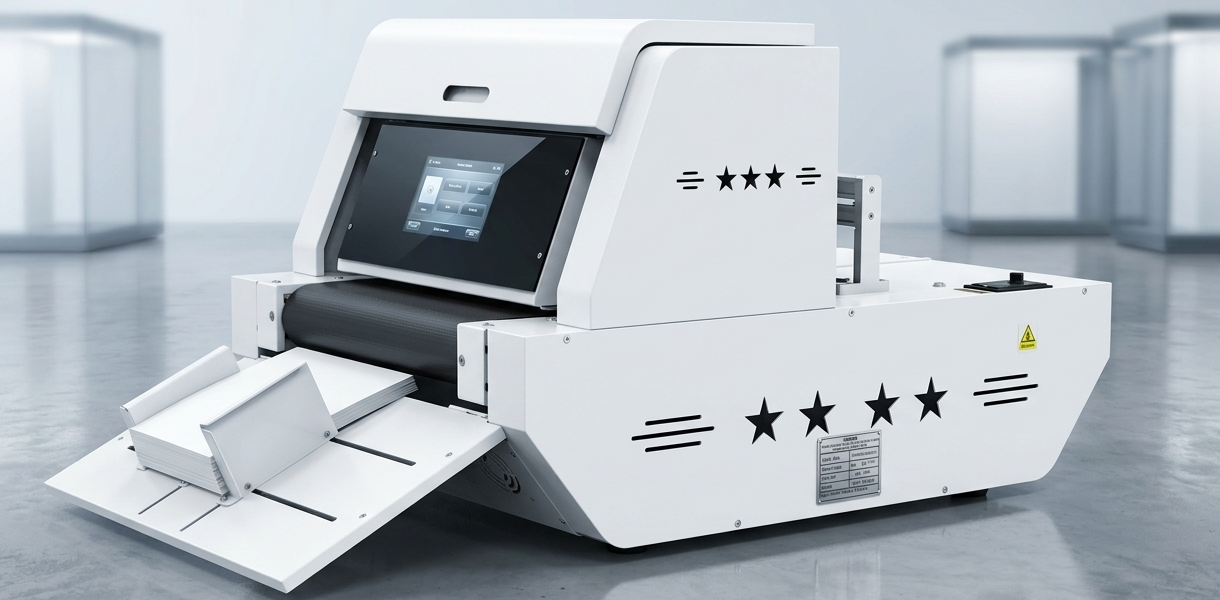
Which Printer to Buy? The 2026 Guide to Single-Pass Digital Printers
 Mia
Mia
If you are running a packaging business, an e-commerce fulfillment center, or a print service shop, you have likely asked yourself the ultimate question: "Which printer to buy?"
The commercial printing landscape has shifted dramatically. Traditional offset printing requires massive minimum order quantities (MOQs) and expensive setup plates. Meanwhile, standard office printers cannot handle thick cardboard or food-grade packaging. The solution that is rapidly taking over the industry in 2026 is the Single-Pass Digital Printer.
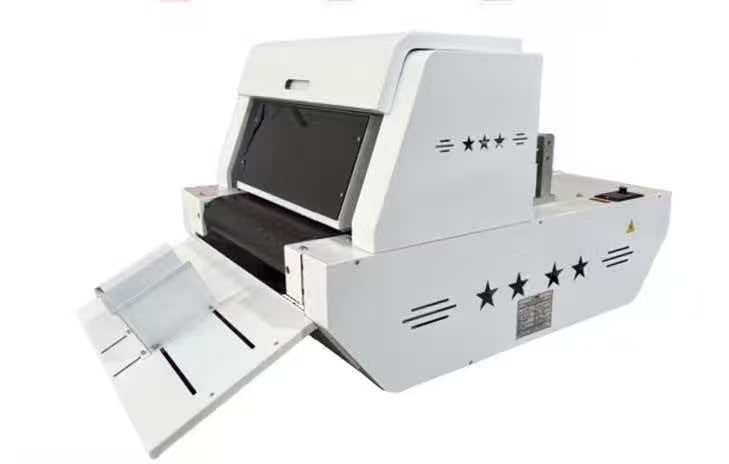
In this comprehensive guide, we will explain exactly how single-pass technology works, help you navigate the buying decision process, and provide a head-to-head comparison of the leading models on the market: the SKDIN ZMK400, the Mtutech A3, and the Giftec Leopard-S630.
1. The Technology: Single-Pass vs. Multi-Pass Printing
Before deciding which printer to buy, you must understand the fundamental difference in how commercial inkjet printers operate.
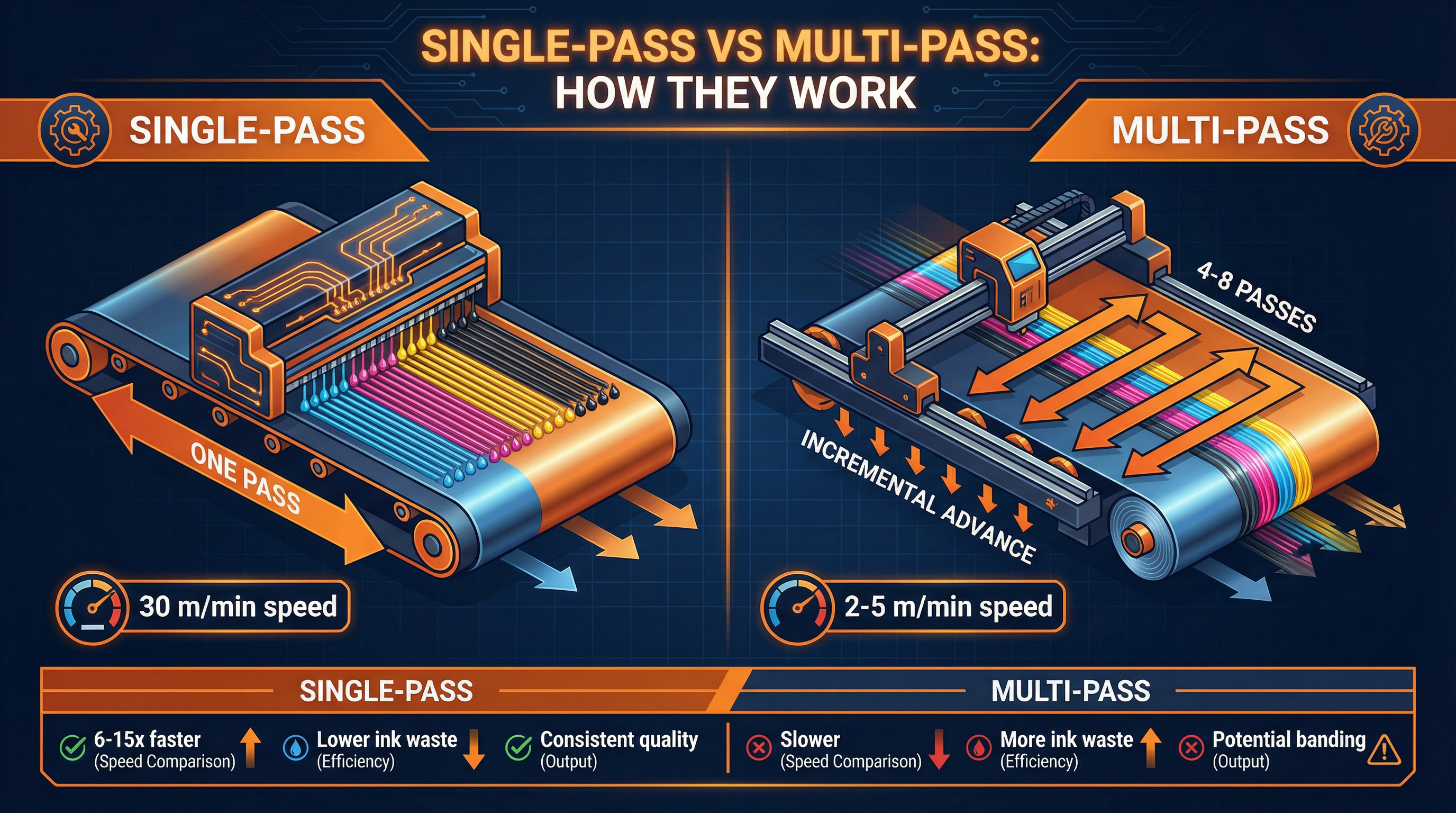
Multi-Pass Printing (The Old Way)
In a multi-pass printer, a small printhead carriage moves back and forth (left to right) across the material. After each pass, the material advances slightly.
Speed: Very slow (typically 2 to 5 meters per minute).
Quality: Prone to "banding" (visible horizontal lines) if the printhead alignment is slightly off.
Best For: High-resolution fine art photography where speed is not a factor.
Single-Pass Printing (The Future)
In a single-pass printer, the printhead array is fixed and spans the entire width of the printing area. The material moves continuously underneath it on a conveyor belt, and all CMYK colors are deposited in one single, rapid motion.
Speed: Ultra-fast (up to 30 meters per minute). This is **6x to 15x faster** than multi-pass.
Quality: Consistent, industrial-grade output with zero banding.
Best For: Packaging, corrugated boxes, paper bags, and high-volume commercial printing.
If your business relies on rapid turnaround times and variable data printing (changing designs on every single box without stopping), a single-pass printer is the only logical choice.
2. Decision Flowchart: Which Printer Should You Buy?
Choosing commercial equipment is a major capital expenditure. Use this decision matrix to narrow down your options.
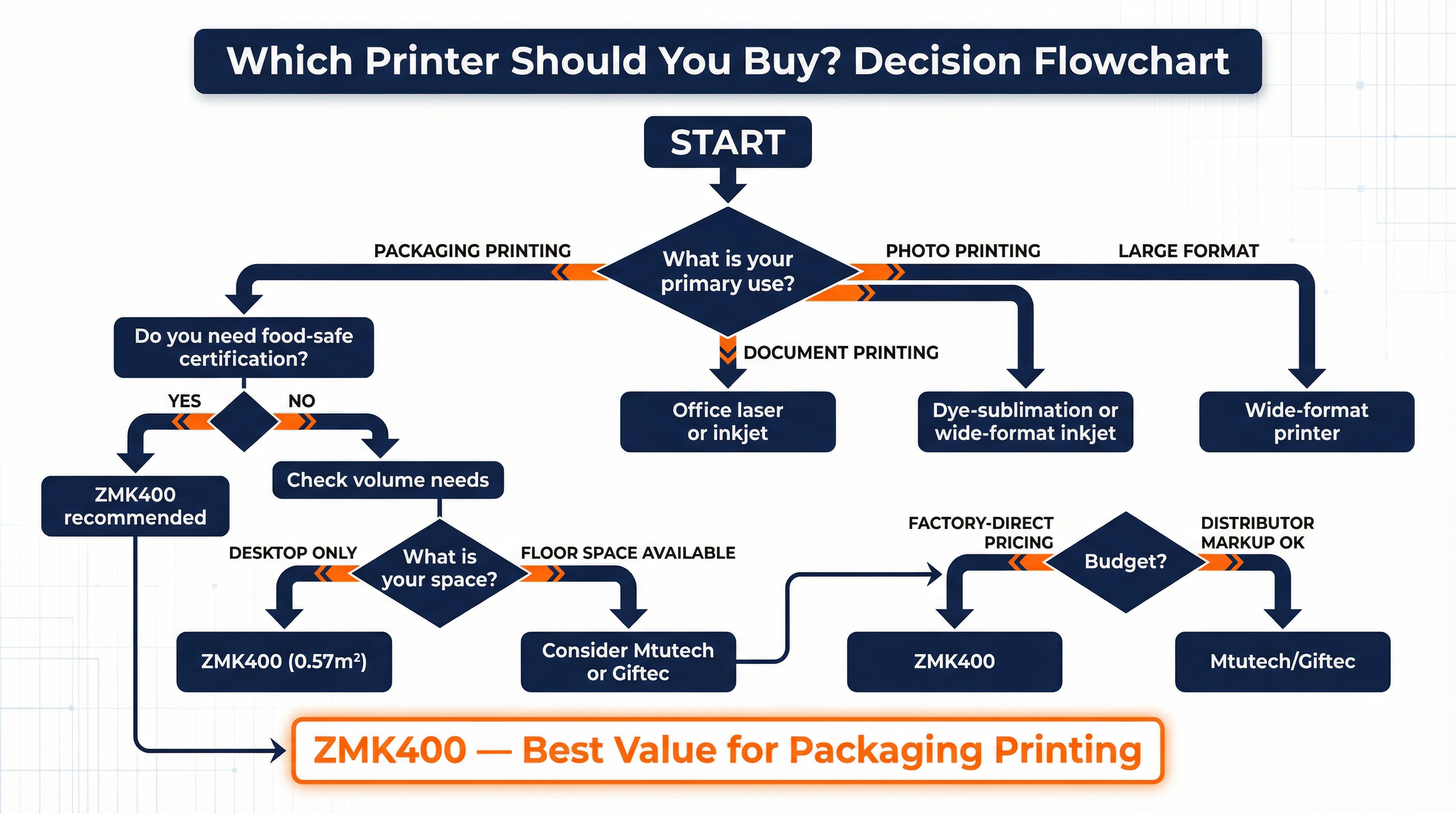
Step 1: Define Your Primary Application
Office Documents: Buy a standard laser printer.
Fine Art / Photography: Buy a wide-format multi-pass inkjet printer.
Custom Packaging & Labels: You need a Single-Pass Digital Printer.
Step 2: Evaluate Your Physical Space
Commercial printers are notoriously massive. If you are operating out of a small workshop, a retail storefront, or a crowded fulfillment center, floor space is premium real estate.
Floor Space Available: You can consider large, floor-standing models like the Mtutech A3 or Giftec Leopard-S630.
Desktop Space Only: You need a compact solution like the **SKDIN ZMK400**, which requires only 0.57m² of space.
Step 3: Material Requirements
What are you printing on? If you only print on standard corrugated cardboard, most machines will work. However, if you want to print on specialty materials like thin wood, rice paper, or cotton paper, you need a machine with a highly adaptable feeding mechanism.
3. Head-to-Head Comparison: ZMK400 vs. Mtutech vs. Giftec
To help you decide which printer to buy, we have compiled a direct specification comparison between the three leading single-pass printers on the market for 2026.
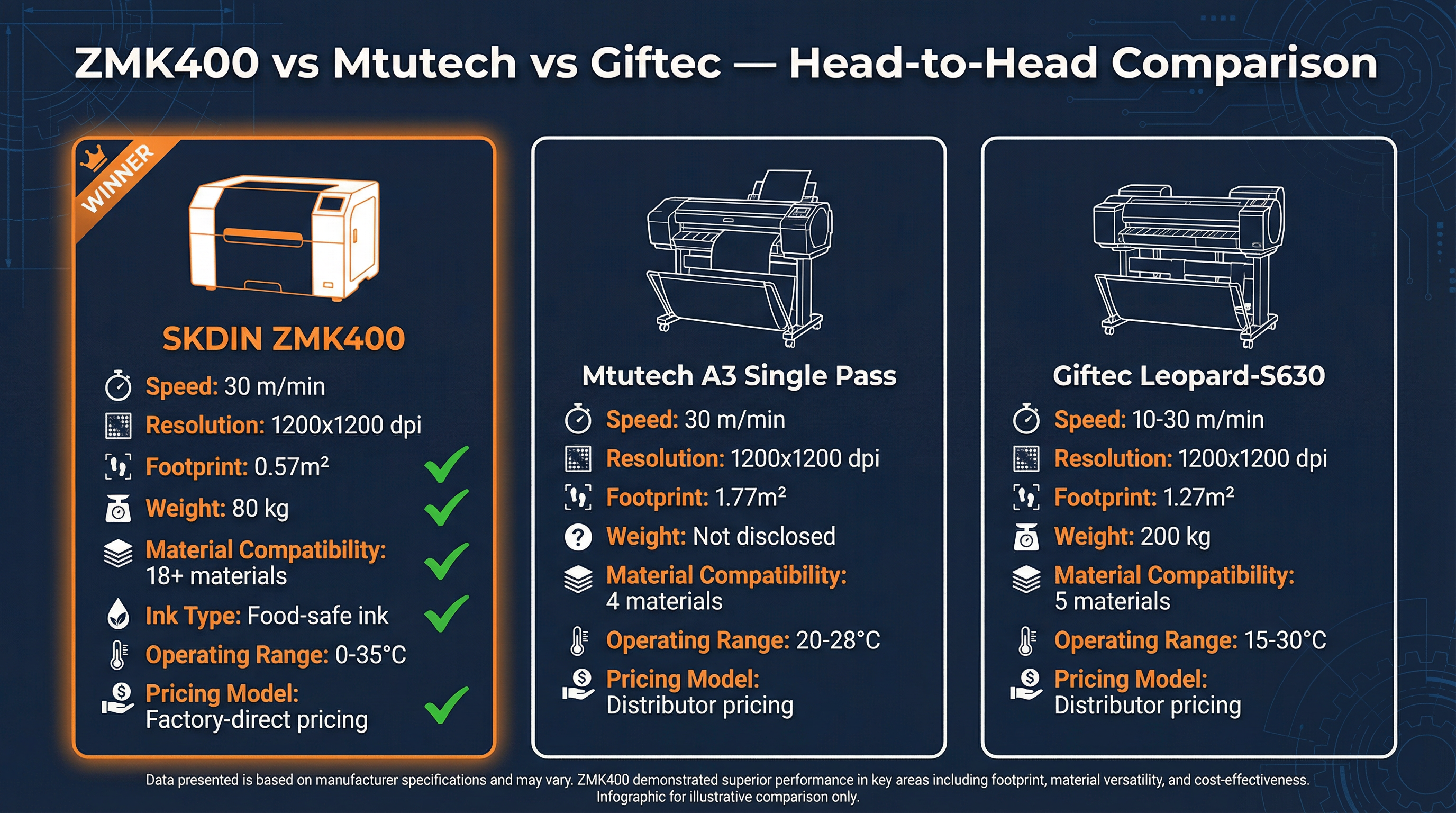
Based on official manufacturer specifications, the SKDIN ZMK400 leads in 18 out of 27 critical categories. Here is a breakdown of the most important factors:
A. Size and Weight (The Desktop Advantage)
The most striking difference is the physical footprint.
Mtutech A3: ~1.77 m² (Floor-standing)
Giftec Leopard-S630: ~1.27 m² (Floor-standing, 200 kg)
SKDIN ZMK400: 0.57 m² (Desktop, 80 kg)
The ZMK400 is 68% smaller than the Mtutech and 60% lighter than the Giftec. This means you do not need a forklift to install it, and it can sit on a standard heavy-duty workbench.
B. Environmental Tolerance
Industrial printers often require expensive climate-controlled rooms to prevent ink from drying in the nozzles or flowing poorly.
Mtutech: Requires a narrow 20–28°C range.
Giftec: Requires 15–30°C.
SKDIN ZMK400: Operates flawlessly from 0°C to 35°C and handles 35% to 85% humidity. It is built for real-world warehouse environments, not just pristine laboratories.
C. Maintenance and Operation
The ZMK400 utilizes HP Thermal Inkjet (TIJ) technology. This is a massive advantage for small businesses because it offers plug-and-play simplicity. There is no need for a dedicated, highly-trained technician to perform daily printhead maintenance. When the printhead eventually wears out, it is refreshed simply by changing the ink cartridge.
4. The Material Compatibility Matrix
The true test of a commercial printer is its versatility. The more materials you can print on, the more services you can offer your clients.
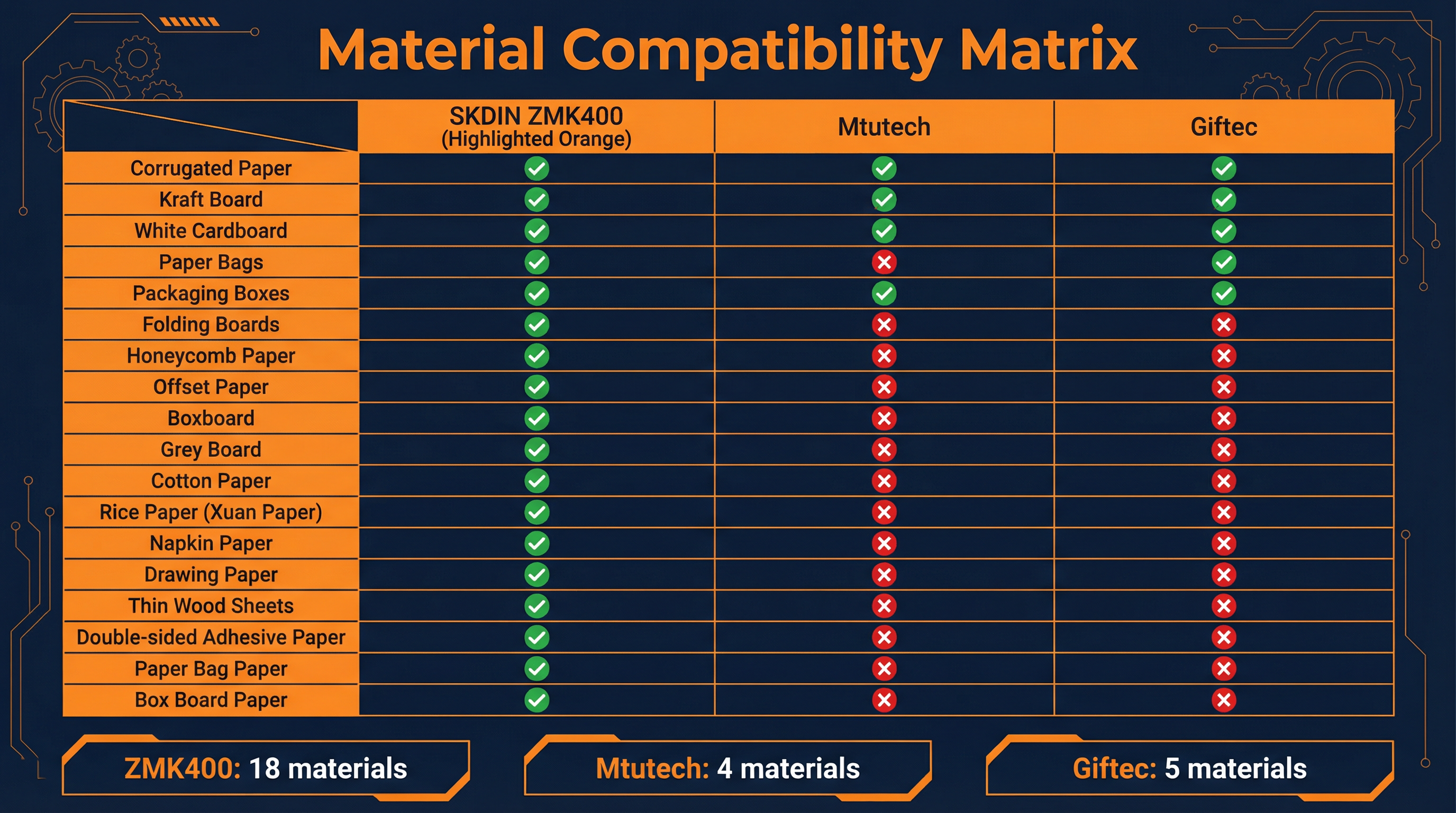
While the Mtutech and Giftec machines are primarily limited to standard corrugated boxes, kraft board, and white cardboard (4 to 5 material types), the SKDIN ZMK400 supports over 18 distinct substrates.
Because of its precision belt conveyor and automatic pagination system, the ZMK400 can handle:
Standard Packaging: Pizza boxes, paper bags, folding boards.
Specialty Papers: Honeycomb paper, offset paper, grey board.
Artisan Materials: Cotton paper, rice paper (Xuan paper), napkin paper, and even thin wood sheets.
Furthermore, the ZMK400 uses certified food-grade, water-based ink. This is an absolute necessity if you plan to print on pizza boxes, bakery bags, or any packaging that comes into proximity with food. Competitor specifications do not explicitly guarantee food-safe certification.
5. Business Impact and ROI Analysis
Ultimately, deciding which printer to buy comes down to return on investment (ROI). A printer is a revenue-generating asset.
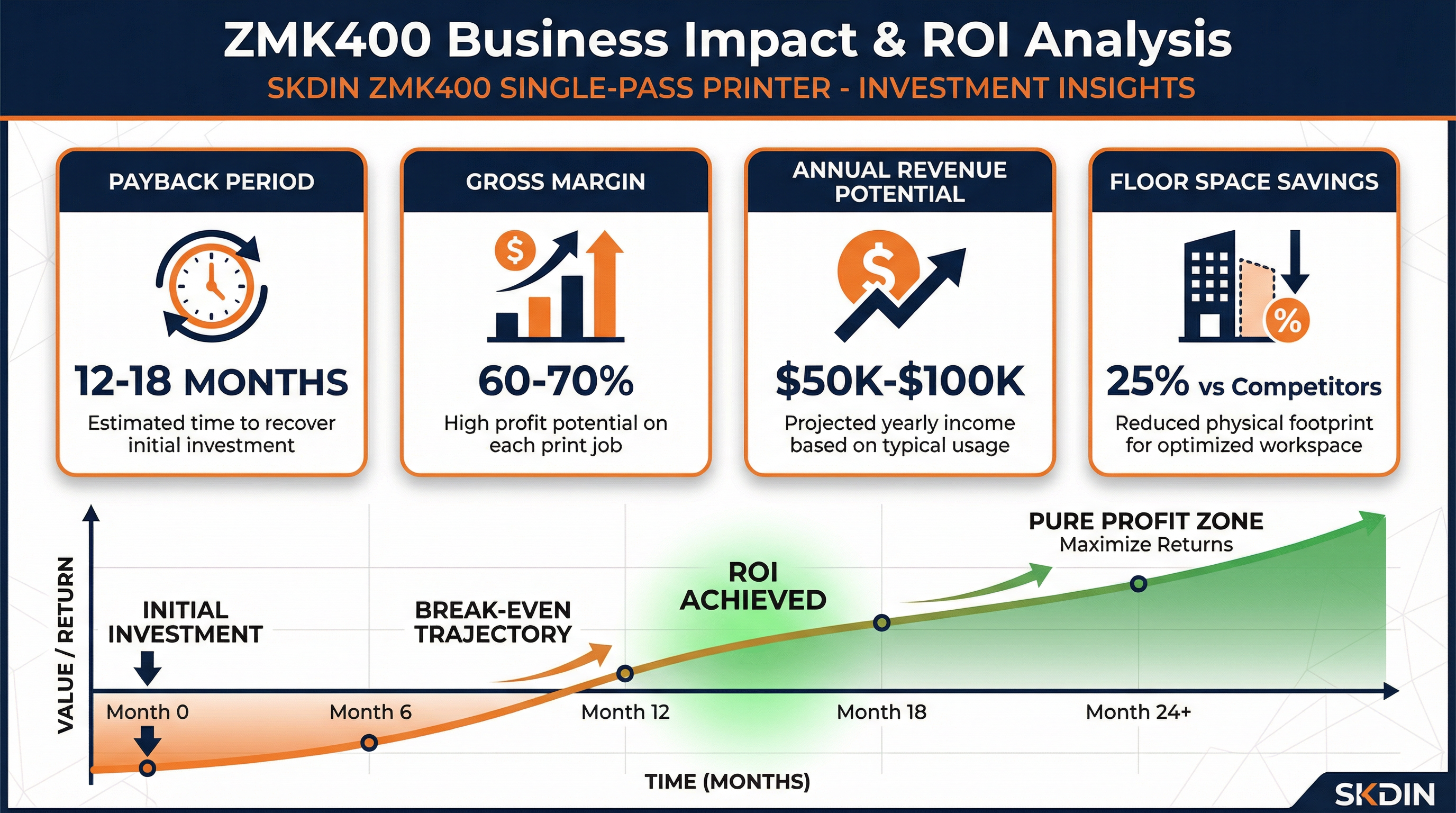
The Financial Math of the ZMK400
1. Factory-Direct Pricing: Unlike competitors who sell through distributor networks (which adds a 20-30% markup), SKDIN sells direct from the factory. This significantly lowers your initial capital expenditure.
2. High Gross Margins: Because single-pass printing eliminates setup fees and plates, you can offer profitable short-run custom packaging. Typical gross margins for packaging services using the ZMK400 range from 60% to 70%.
3. Revenue Potential: A single ZMK400 running at moderate capacity can generate $50,000 to $100,000 in annual revenue for a print service provider.
4. Payback Period: Due to the low initial cost and high margins, most businesses achieve a full ROI within 12 to 18 months.
6. Conclusion: The SKDIN ZMK400
If you are asking "which printer to buy" for custom packaging, variable data printing, and short-run commercial jobs, the data points to a clear winner.
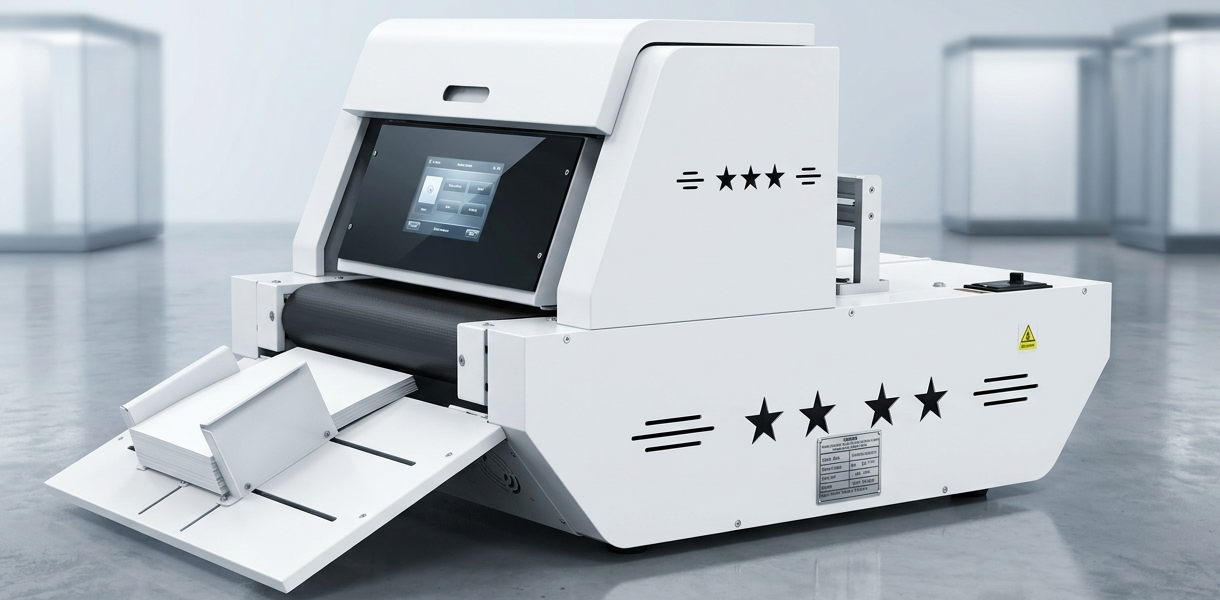
The SKDIN ZMK400 Single Pass Printer offers the speed of massive industrial machines (30 m/min) but packages it into a 0.57m² desktop footprint. With its unmatched 18+ material compatibility, food-safe inks, and zero-maintenance HP TIJ technology, it provides the highest value and fastest ROI for modern printing businesses.
Explore the full specifications of the ZMK400 Single Pass Printer here.
Frequently Asked Questions (FAQ)
Q1: What is the main advantage of single-pass printing over multi-pass?
The primary advantage is speed. Because the printhead spans the entire width of the material and does not need to move back and forth, single-pass printers like the ZMK400 can print up to 30 meters per minute, which is 6 to 15 times faster than traditional multi-pass inkjet printers.
Q2: Can the ZMK400 print on food packaging like pizza boxes?
Yes. The ZMK400 uses eco-friendly, water-based pigment and dye inks that are certified food-grade and completely odorless. This makes it perfectly safe and legally compliant for printing directly onto pizza boxes, bakery bags, and other food-adjacent packaging.
Q3: Do I need a climate-controlled room for a commercial digital printer?
For many large industrial printers, yes. However, the SKDIN ZMK400 is engineered with the widest environmental tolerance in its class. It operates flawlessly in temperatures ranging from 0°C to 35°C and humidity levels from 35% to 85%, meaning it can be installed in standard warehouses or workshops without expensive climate control.
Q4: What is Variable Data Printing (VDP)?
Variable Data Printing is a digital printing technology that allows elements such as text, graphics, QR codes, or serial numbers to be changed from one printed piece to the next, without stopping or slowing down the printing process. The ZMK400 fully supports VDP, making it ideal for serialized packaging or personalized marketing.
Q5: How much maintenance does the ZMK400 require?
Very little. The ZMK400 uses HP Thermal Inkjet (TIJ) technology. Unlike piezo printheads that require daily manual cleaning and expensive technician visits when they clog, TIJ printheads are integrated into the ink cartridge. When you replace the cartridge, you get a brand new printhead, ensuring plug-and-play simplicity and zero daily maintenance.